Imprint: Learn Visually
- 4.5
- Rating
- 1.00M
- Installs
- Free
- Price

 Analysis by App-foxy
I approached Imprint: Learn Visually as a study tool rather than as another app to open whenever I had a spare minute. Its promise is appealing: help me read faster and remember more by turning learning into a visual experience. That makes it especially interesting for people who struggle with long blocks of text, want an easier way into unfamiliar subjects, or need a compact learning habit that fits around work and family life.
Imprint is a free education app from Polywise, available to everyone and supported on Android devices running version 8.0 or later. It has built a sizeable audience, with over a million installs, a 4.4 average from around twelve thousand ratings, and roughly fifteen hundred written reviews. Those figures suggest that the concept is easy to understand and useful to many learners, but they do not remove the need to ask a more important question: is visual learning actually the right format for the way you want to study?
How I Decided Whether Imprint Was Worth Keeping
My first test was simple. I wanted to know whether the app could help me begin learning when I had limited attention, not whether it could replace a textbook or a serious course. I also looked at whether the visual presentation supported understanding or merely made information look attractive. That distinction matters. A polished card can make a fact memorable for a moment, while a well-structured explanation can help me connect ideas several days later.
You May Also Like

 Blood Strike: 2.5 Anniversary
Blood Strike’s Loadouts Turn Every Drop Into a Tactical Gamble
A close look at Blood Strike’s custom loadouts: how fast access to signature weapons reshapes its battle royale rhythm, rewards preparation, and narrows the gap between fights.

 Pandora - Music & Podcasts
Pandora’s Music Is Easy to Start, but Harder to Recover
Pandora’s strength is its low-effort path from a seed to a station. Its weak spot is how much confidence it asks you to place in connection, setup, and quiet recovery.

 8 Ball Pool
 Is Built on Rivalries, Rematches, and Routine
A close look at the rivalries, rematches, shared routines, and unanswered safety questions that turn a quick pool match into a persistent mobile community.

 Samsung Music
’s Quiet Strength Is Playing What You Already Own
Its reach comes less from spectacle than from dependable access to a personal library. That simplicity is both the app’s strongest retention engine and its ceiling.

 AccuWeather: Weather Radar
AccuWeather Review: A Quick, Clear Forecast for Everyday Decisions
For everyday plans, the best forecast is the one you can understand quickly. AccuWeather makes rain timing, radar, and local conditions easy to act on, with a few trade-offs.

 Hill Climb Racing
Why Hill Climb Racing Still Turns Crashes Into One More Run
A tiny car, a bumpy hill and one more upgrade: Hill Climb Racing keeps resurfacing because its simple chaos makes every near-miss feel personal.
More From Our News Desk



I judged the experience using four practical questions. Can I understand the main idea without already knowing the subject? Can I return to it without feeling that I am starting over? Does the format suit quick sessions as well as longer ones? And does it give me enough substance to justify choosing it over an article, audiobook, video lesson, or conventional book?
Those questions place Imprint in a useful middle ground. It is not trying to be a complete academic curriculum, and I would not use it as my only resource for an exam or technical qualification. Its strongest role is as a guided introduction: a way to get the shape of a subject, identify ideas worth exploring, and make learning feel less demanding at the point of entry.
Visual learning is helpful, but it changes what “remembering” means
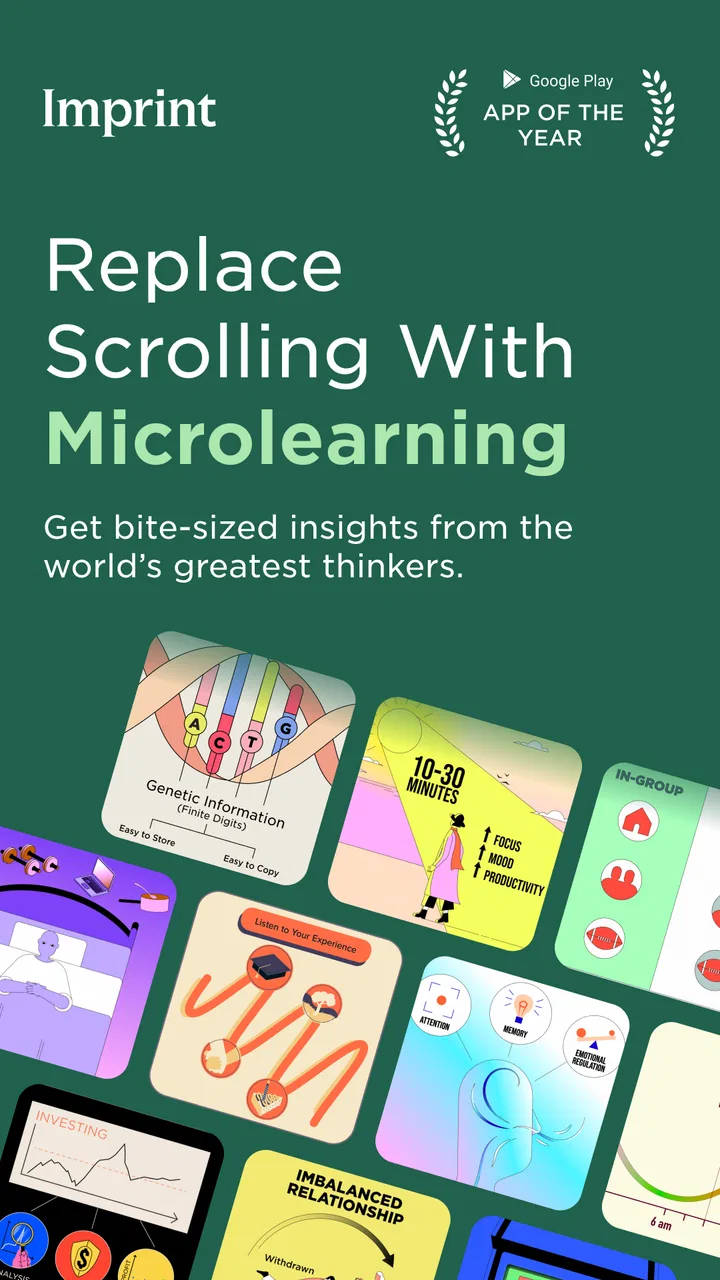
The visual approach is the defining choice. Instead of asking me to work through a dense page before I know whether the subject interests me, Imprint presents ideas in a more digestible form. I found that useful when I was tired or distracted, because the screen gave me a clear path through the material rather than an intimidating wall of text.
There is a trade-off, though. Visual compression can improve access while reducing nuance. A short explanation may give me the central concept without showing every exception, debate, or technical detail. I therefore treated each lesson as a map, not as the entire territory. When something caught my attention, I made a note to investigate it elsewhere instead of assuming that a brief presentation had settled the subject.
The best way to use Imprint is as a first pass, not a final authority. That mindset prevents disappointment and turns one of its limitations into a strength. I can use it to decide what deserves deeper study, then move to a book, primary source, class, or specialist reference when accuracy and detail matter more than speed.
What makes it easier to start a learning habit
Many education apps fail before the lesson begins. They give me too many choices, too much setup, or an interface that feels like homework. Imprint’s appeal is that it lowers the psychological cost of starting. I do not need to prepare a desk, gather materials, or commit to a long reading session. That makes it a practical choice for a commute, a lunch break, or the few minutes before bed.
One routine worked particularly well for me: I used a short session to explore a subject, stopped when I found an idea worth retaining, and then explained that idea in my own words without looking at the screen. That last step is important. Passive exposure feels productive, but recalling and rephrasing the idea reveals whether I actually understood it.
Another useful workflow is to separate discovery from deeper study. I used Imprint when I wanted breadth, then kept a small list of topics that deserved longer reading. This prevented me from trying to force every lesson into a complete course and made the app more valuable as a personal filter for deciding where to spend my time.
Where the app is a particularly strong fit
I would recommend it first to curious adults who want a regular learning habit without committing to a formal program. It also suits readers who lose focus in conventional articles, visual thinkers who prefer concepts broken into digestible pieces, and people returning to education after a long gap. The accessible format can make an unfamiliar subject feel approachable enough to begin.
It can also help someone prepare for a conversation. Before attending a meeting, visiting a museum, starting a book, or joining a discussion about a broad topic, I could use a session to build basic context. That is not the same as expertise, but it is often enough to recognize the major ideas and ask better questions.
Parents may find the format useful for exploring subjects alongside an older child, although I would still preview material and guide the discussion rather than hand over responsibility for learning entirely to the app. The Everyone age rating makes it broadly accessible, but an age label does not automatically mean that every explanation will match a particular child’s reading level or interests.
Where I noticed the limits
Imprint is less convincing for learners who need systematic practice. If my goal is to master vocabulary, solve equations, write code, or prepare for a standardized test, I need exercises, feedback, and a clear progression. A visually engaging explanation can support those activities, but it cannot replace them.
I would also hesitate to rely on it for professional decisions or subjects where small distinctions have serious consequences. In those situations, I want source transparency, detailed references, and the ability to inspect competing interpretations. A concise learning format is useful for orientation, but it is not a substitute for specialist material.
There is a further risk for fast readers. Because the presentation feels smooth, I may move through it quickly and mistake recognition for memory. I had to slow myself down, pause after important points, and test what remained in my head. If I simply swipe through attractive explanations, the app becomes entertainment with educational decoration rather than a real learning tool.
How it compares with familiar alternatives
Compared with a traditional book, Imprint is easier to sample and less demanding at the beginning. A book usually wins when I want sustained argument, detailed evidence, or a carefully developed narrative. I would choose the book after Imprint has helped me identify a subject I genuinely want to study.
Compared with an audiobook, the app is better suited to information that benefits from visual structure. An audiobook is more convenient while driving, walking, or doing housework, whereas Imprint asks me to look at the screen. That makes the two formats complementary rather than interchangeable.
Compared with a video course, Imprint can feel more focused because it does not depend on a presenter’s pace or production style. Video wins when demonstrations, tone of voice, or extended explanation are essential. I would choose video for a practical skill and Imprint for a compact conceptual overview.
Compared with a standard note-taking app, Imprint gives me prepared learning material instead of an empty page. That reduces effort, but it also reduces control. A note app is better when I already know what I want to study and need to organize my own sources. Imprint is better when I want help choosing a starting point.
Three ways to get more from the visual format
- Use it before, not after, deeper research. A session can give me a vocabulary and a rough framework, making a difficult article easier to approach.
- Turn recognition into recall. After a lesson, I close the app and write three points from memory. If I cannot do that, I revisit only the weak area instead of replaying everything passively.
- Build a subject trail. I note the ideas that raise questions, then use those questions to choose a book, lecture, or reliable reference. This keeps the app from becoming an endless stream of disconnected topics.
A fourth tactic is to use it when motivation is low, but not to let low-effort sessions become the whole routine. On busy days, a brief visual lesson keeps the habit alive. On quieter days, I follow it with active notes or further reading. That balance is more realistic than expecting every session to produce deep mastery.
The practical cost of changing from another learning method
Switching to Imprint is easy if I am replacing idle scrolling with a short learning session. I do not need to redesign my entire study system, and the free entry point makes experimentation straightforward. The current version is 3.10.3, so I would simply make sure my device meets the Android requirement before planning around it.
The bigger cost is not installation; it is changing expectations. Someone moving from textbooks may miss depth. Someone moving from podcasts may dislike needing to watch the screen. Someone moving from a structured course may find the experience too open-ended. I would keep existing tools for tasks they handle better and use Imprint as the visual layer at the beginning of the process.
The app also includes optional in-app purchases priced from $15.99 to $99.99 per item. Since the app itself is free, I could test the basic experience before deciding whether any paid option belongs in my routine. I would make that decision based on repeated use, not curiosity on the first day. If I am not returning regularly, paying for more content will not solve the underlying habit problem.
Questions I would ask before installing
Will it work on an older phone? It supports Android 8.0 and later, which covers many devices, but I would still expect the smoothness of the experience to depend on the phone itself and the way I use it. A larger screen may also make visual material more comfortable than a very small one.
Can it replace a course? I would say no. It can introduce concepts and help me decide what to study, but a course normally adds assignments, feedback, progression, and assessment. For a credential or job-related skill, I would pair Imprint with a more structured resource.
Is it useful if I already read a lot? Yes, particularly as a discovery tool. It can help me scan unfamiliar areas before choosing a longer book. However, a confident reader who wants maximum depth may find the compressed format restrictive and prefer going directly to original or specialist material.
Does the visual style guarantee better memory? No. It can make ideas easier to approach and may provide useful mental hooks, but memory still depends on attention, recall, repetition, and meaningful connections. I got the best results when I actively summarized what I had seen.
Is it suitable for everyone? The Everyone rating makes it broadly accessible, but suitability still depends on purpose. A casual learner, curious beginner, or distracted reader is likely to benefit more than someone seeking rigorous examination preparation or detailed professional reference material.
My recommendation after using it as a decision tool
I recommend Imprint to anyone who wants a low-friction way to explore ideas and build a regular learning habit. Polywise has chosen a clear identity, and the visual format gives the app a genuine reason to exist alongside books, podcasts, videos, and note-taking tools. Its strongest value is not that it makes every subject complete; it makes more subjects feel possible to begin.
I would skip it if I need exercises, formal assessment, extensive citations, or a carefully sequenced qualification path. In those cases, a textbook, course platform, tutor, or specialist reference will serve me better. I would also avoid paying for expanded access until I had proved that the free experience fits my routine.
For me, the deciding test is simple: after a session, do I understand an idea well enough to explain it, question it, or pursue it further? When the answer is yes, Imprint has done its job. It is a practical companion for visual learning and everyday curiosity, provided I use it as the beginning of understanding rather than pretending that a quick, attractive explanation is the end.
FAQs for Imprint: Learn Visually
01What is Imprint: Learn Visually and how does it work?
Imprint: Learn Visually is an educational app designed to help users absorb information more effectively through visual learning techniques. It offers a range of interactive lessons and visual aids, such as infographics and diagrams, to improve understanding and retention. The app caters to various learning styles by integrating videos, quizzes, and interactive content.
02Is Imprint: Learn Visually suitable for all age groups?
Yes, Imprint: Learn Visually is designed to accommodate a wide audience, from students to adult learners. The app features content tailored for different educational levels and interests, making it versatile for users of various ages. However, younger users may require parental guidance to navigate more advanced topics.
03What subjects does Imprint: Learn Visually cover?
Imprint: Learn Visually covers a broad spectrum of subjects, including science, history, mathematics, and art, among others. The app continually updates its content to include new topics and trends, ensuring users have access to a comprehensive learning experience. This variety makes it a valuable resource for both formal education and personal enrichment.
04Does Imprint: Learn Visually require an internet connection?
An internet connection is required for initial downloads and content updates. However, once lessons are downloaded, many can be accessed offline, allowing users to learn on the go without needing constant connectivity. This feature is particularly useful for users with limited internet access or those who prefer studying without interruptions.
05Are there any costs associated with using Imprint: Learn Visually?
Imprint: Learn Visually offers a freemium model. Users can access a variety of content for free, but premium features or additional lessons may require a subscription or one-time purchase. This model allows users to experience the app's core features before deciding to invest in more advanced content or tools.
Pros
- Intuitive interface for easy navigation.
- High-quality visual content aids learning.
- Wide range of topics available.
- Offline access for learning on the go.
- Regular updates with new content.
Cons
- Requires a large amount of storage.
- Limited interactive elements.
- Subscription needed for full access.
- Occasional bugs in the app.
- Some topics lack depth.

Imprint: Learn Visually
Gallery